


ACCOUNT
Account and phone status
Check whether phone confirmation is complete, update permitted account fields and locate password assistance.
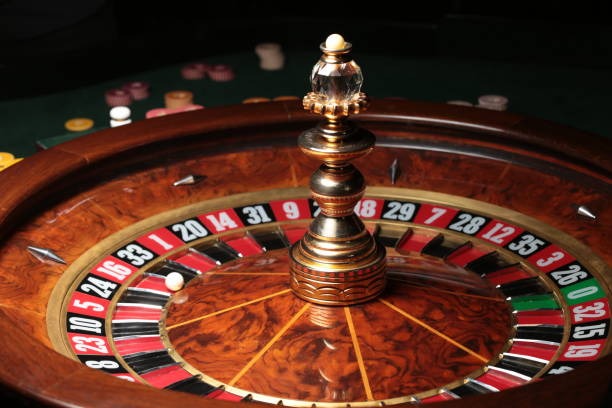
lexustoto puts Live Roulette Gold, Garuda Flight Megaways and badminton markets behind one account, with DANA and QRIS status shown beside the cashier path.

Slots sit beside live dealer tables, fishing rooms and card games, so you can move between categories without reopening the home page.
Pragmatic Play, PG Soft and Habanero appear beside other recognised studios, with each studio name shown on its game card before you open it.
DANA, OVO, GoPay and QRIS appear as separate cashier choices, so you can select the wallet you actually use before entering an amount.
Useful account pages remain accessible from the home navigation after you enter a game. We keep wallet status, support, terms and account controls separate from promotional panels, making important records easier to…



A clear phone-verification path comes first on our home page. Enter the requested account details, confirm your phone and return through the same account button whenever you need…
A stalled login or wallet entry needs a direct contact path, not another category menu. Open live chat from the help panel for an active issue, or use email when a receipt attachment is needed. On mobile, the support link remains available from the main menu and cashier area.
Use live chat when account access, phone confirmation or a transaction state needs checking. Include the visible status and relevant reference, but never send your password through the chat window.
Email suits cases that require a receipt image or a longer explanation. State the wallet name, transaction reference and account phone ending without placing full credentials in the message.
Open the mobile menu and select the help entry without leaving the browser. The same route can be reached from the cashier when a DANA, GoPay or QRIS state stalls.
The mobile home page keeps account access, lobby search and cashier status in one vertical path.
Phone confirmation creates a clear checkpoint before full account access. We keep password recovery within the account path, show transaction states in the cashier and make sign-out available…
Searching separate pages for games, wallet status and contact details adds unnecessary steps. Our home route keeps category entry, account state, cashier records and support links connected.
Slots, live tables, arcade rooms, card games and sports use one category bar. Separate searches often hide the route back, while our home navigation remains available after each category change.
The cashier places submitted DANA, OVO, GoPay and QRIS entries in one record area. This is clearer than checking several unrelated pages for the state of one transaction.
Casino and sportsbook access share one confirmed account. You do not need a second profile when moving from Live Roulette Gold to football, badminton or basketball markets.
A lobby search finds named games such as Fishing War Arcade and Omaha Turbo Round. Category filters remain available if you prefer browsing by slots, live tables or card format.
Help routes sit beside account and cashier areas, where most access questions begin. That placement lets you reference the visible state instead of describing an issue without its context.
Phone and computer layouts use the same account, category and cashier sequence. Screen size changes the arrangement, but it does not create a separate wallet or game profile.
Game behaviour differs by category, so we separate published return data, table rules and market terms instead of presenting one figure for the whole lobby.

Studio-supplied RTP details may appear within the title panel or embedded game rules.
Table limits, wheel rules and result handling belong to the selected live room.
Blackjack, Dragon Tiger and poker variants display rules specific to each table.
Aviator and fishing rooms use round mechanics shown within the individual game.
Football, badminton and basketball entries use market-specific odds and settlement terms.
RTP percentages are informational reference values from provider documentation. Actual session outcomes vary.
Our home page is configured for Indonesia wallet rails and English content intended for an Indonesian audience. You can open it through a current phone or computer browser and use DANA, OVO, GoPay, QRIS, virtual account or bank transfer where shown in the cashier. Service availability, account eligibility and individual game access depend on local law. Location does not change the account path: phone confirmation comes before normal lobby and cashier access.
The useful parts of our home page are visible before you enter a title: named lobby categories, account status, local wallet choices, game search, support access…
Enter part of Garuda Flight Megaways in the slot search and open its game card from the results. The search remains close to category filters on smaller screens.
Live Roulette Gold sits in the dealer-table area beside baccarat, blackjack and Dragon Tiger context. Table rules remain tied to the room you select.
DANA, OVO, GoPay and QRIS are shown as distinct choices. You select the intended rail before entering transaction details, reducing mistakes between wallet types.
Football, badminton and basketball have configured market areas in the sportsbook. You can return to casino categories through the shared home navigation.
The account panel identifies phone-confirmation and access states. If a step remains incomplete, its position gives you a clearer starting point for live chat.
Terms, privacy wording and access conditions remain available through the footer. You can check these pages before entering a game or submitting a wallet action.
These answers focus on using the lexustoto home page, including account access, lobby categories, Indonesian wallets, mobile behaviour and support routes. Check the account panel and cashier status first when something stalls, because those areas show the specific stage our support channel will ask about.
Begin with the account control at the head of the home page, then use the category bar for slots, live casino, arcade games, poker or sports.
Open this area for phone-confirmation state, password assistance and sign-out. It is also the sensible first stop when the lobby does not appear after you enter account details.
Use the category bar to move among slots, live tables, fishing, arcade and poker rooms. The selected category stays marked while you browse its available cards.
The sports area separates football, badminton and basketball markets from casino cards. Your account remains the same when you move between the sportsbook and the main lobby.
Open the wallet row for DANA, OVO, GoPay, QRIS, virtual account or bank transfer. If a status needs checking, the nearby help link reaches live chat.